
 Version Française
 Русская версия
 WikipédiA
 |
Elektronika MK-161
Version Française
Русская версия |
WikipédiA |
 |
 |
 |
 |
 |
 |
 A calculator made in Russia with RPN logic and programmable! |
Wonderful evolution from the MK-61/52 models with:
|
| MK-Compiler | Emulator | The menus | Extended programming | USOMK-4 I/O module | Disk UZVMK-1 | Speed/Precision | Graphic Interface |
I wrote the MK-Compiler that allows you to write your program on a PC using a high-level language
and to send them via RS-232 to the calculator. The program includes:
|
 MK-Compiler's main screen |
 MK-COMPILER 161. Content: MK-COMPILER 161. Content:
|
 |
 |
 |
| Then you send the program to your calculator... Next, an example of a program containing binary data. |
 |
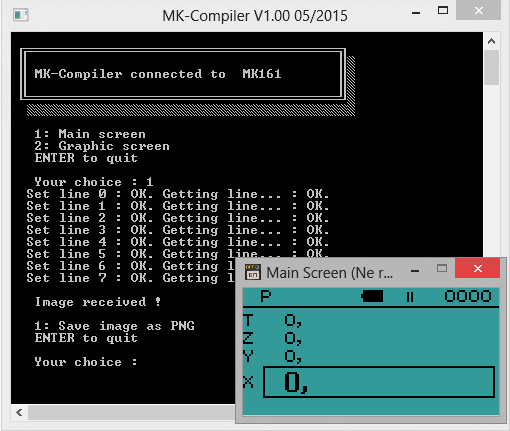
And you can grab the main or graphic screen of the MK. Next, screen capture of the main screen. |
 |
One example: PI calculation
     ; just one register required
#REG 0 N

DO
     ; display the prompt on the comment line
  #NUM ask
  EXEC \CPrintStringB

     ; wait for a value
  INPUT

     ; stored in N
  STO N

     ; prepare the comment line for the answer
  #NUM result
  EXEC \CPrintStringB

     ; at start, sum is zero
  CX

     ; computes the sum of 1/n²=PI²/6
  FOR N
    @N X^2 1/X +
  NEXT

     ; corrections to find PI
  6 * SQR

     ; stop to display
  STOP
LOOP

     ; binary zone for text data
#BINARY

     ; TEXTN adds a leading 0A (new line) and
     ; an ending nul character.
     ; newline is required to clear the comment line

ask:
#TEXTN "How many loops?"
result:
#TEXTN "Pi approximation"
|
Compiled listing
PROGAM ZONE Step | Code | Keys ------------------------- 0000 | 01 | 1 0001 | 00 | 0 0002 | 00 | 0 0003 | 00 | 0 0004 | F4 | PP M 0005 | 90 | 9 0 0006 | 27 | 2 7 0007 | 50 | R/S 0008 | 40 | M 0 0009 | 01 | 1 0010 | 00 | 0 0011 | 01 | 1 0012 | 07 | 7 0013 | F4 | PP M 0014 | 90 | 9 0 0015 | 27 | 2 7 0016 | 0D | CX 0017 | 60 | RM 0 0018 | 22 | F X^2 0019 | 23 | F 1/X 0020 | 10 | + 0021 | 5D | F L0 0022 | 17 | 1 7 0023 | 06 | 6 0024 | 12 | * 0025 | 21 | F SQRT 0026 | 50 | R/S 0027 | 51 | GOTO 0028 | 00 | 0 0 |
     BINARY ZONE
  Step  | Code | Comment
-------------------------
  1000  |  0A  | newline
  1001  |  48  | "H"
  1002  |  6F  | "o"
  1003  |  77  | "w"
  1004  |  20  | " "
  1005  |  6D  | "m"
  1006  |  61  | "a"
  1007  |  6E  | "n"
  1008  |  79  | "y"
  1009  |  20  | " "
  1010  |  6C  | "l"
  1011  |  6F  | "o"
  1012  |  6F  | "o"
  1013  |  70  | "p"
  1014  |  73  | "s"
  1015  |  3F  | "?"
  1016  |  00  | nul
  1017  |  0A  | newline
  1018  |  50  | "P"
  1019  |  69  | "i"
  1020  |  20  | " "
  1021  |  61  | "a"
  1022  |  70  | "p"
  1023  |  70  | "p"
  1024  |  72  | "r"
  1025  |  6F  | "o"
  1026  |  78  | "x"
  1027  |  69  | "i"
  1028  |  6D  | "m"
  1029  |  61  | "a"
  1030  |  74  | "t"
  1031  |  69  | "i"
  1032  |  6F  | "o"
  1033  |  6E  | "n"
  1034  |  00  | nul
-------------------------

  Addr  |  Name
-------------------------
B 1000  |  ASK
B 1017  |  RESULT
-------------------------

   Reg  |  Name
-------------------------
     0  |  N
  9027  |  \CPRINTSTRINGB
-------------------------

--     END OF FILE     --
|
Back to step 0000 with B/O, then run the program with R/S. First screen:  I tried 500 iterations (key in 500 then R/S), here is the corresponding PI value: 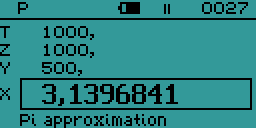 You can press R/S again to enter a new value. I tried 10000:  |
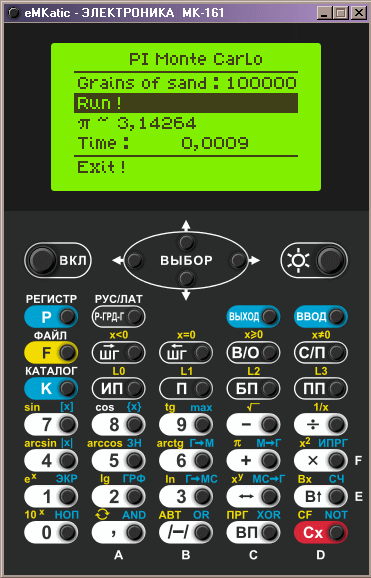 The emulator running my program PI Monte Carlo |
Just add this line:
#MKFiles 2in your source code and the compiler will generate the three files according to what your program uses:
Run the emulator and, with a right clic, make this pop-up appear: 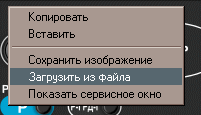 Select the line as show to load your files.  eMKatic supports localization and you can download language files. For example, english: eMKatic supports localization and you can download language files. For example, english: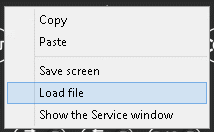 |
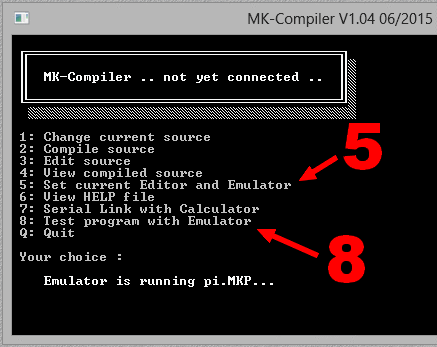
As of version 1.04, MK-Compiler is able to call directly the emulator sending it all files created.
|
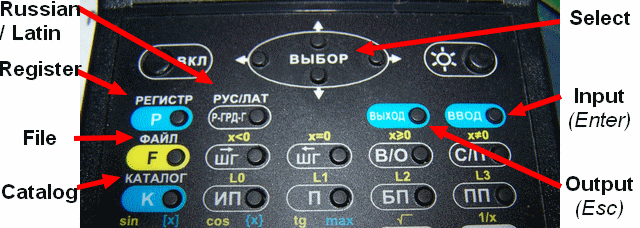
| Next you'll find the keys used when navigating through the menus. Some keys can have different actions according to the context. You access the root of the menu with OUTPUT |
 |
How to key in a STO or RCL from the keyboard:
|
There are lots of functions covering a wide range of domains:
|
This can be useful, the key codes :
Note : code 26 is never returned as it stops the program. Keys ON and Light do not return any code. |
Use #FONT/#DEFCHAR to redefine characters. |
Use #FINDFILE/#CREATEFILE/#LOADFILE to manage folders and files. |
Use an interrupt to play music while some lines are displayed. |
Use #DEFGRAPH to define sprites and display them (below, the example) |
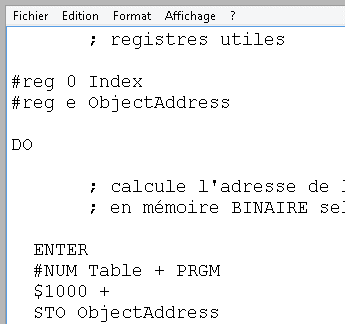
This programs takes a value 0, 1 or 2 in input and then displays 20 times the corresponding pattern at random screen positions. The choice is 0=star, 1=square et 2=circle. At the end, the program waits for a key, you can enter a new value and press R/S.
       ; used registers

#reg 0 Index
#reg e ObjectAddress

DO

       ; computes the pattern address
       ; in BINARY memory using a table

  ENTER
  #NUM Table + PRGM
  $1000 +
  STO ObjectAddress

       ; clear screen

  0 EXEC \CLS

       ; for 20 loops

  $20 STO Index

  FOR Index

       ; random coordinates
    $56 RND *
    $120 RND * SET \x0y0

       ; then the pattern is drawn
    @ObjectAddress EXEC \PUTGB

  NEXT

       ; display the graphic screen
  GRPH

       ; wait for a key
  REPEAT
    GET \NEXTKEY
    NOT
  UNTIL(x<>0)

       ; wait for a new value
  INPUT

LOOP

       ; table with 3 addresses
Table:
#DAL star square circle #END
|
       ; swap to BINARY memory
#BINARY

star:
#DEFGRAPH
  *..*..*
  .*.*.*.
  ..***..
  *******
  ..***..
  .*.*.*.
  *..*..*
#END

square:
#DEFGRAPH
  *******
  *.....*
  *.....*
  *.....*
  *.....*
  *.....*
  *.....*
  *******
#END

circle:
#DEFGRAPH
  ..***..
  .*...*.
  *.....*
  *.....*
  *.....*
  *.....*
  .*...*.
  ..***..
#END
|
The 20 stars, value 0. 
The 20 squares, value 1. 
The 20 circles, value 2. |
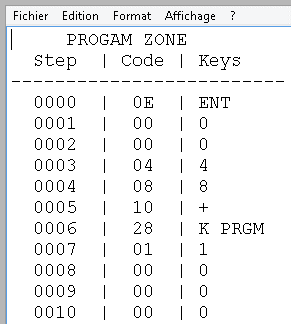
And the resulting compiled program:
     PROGAM ZONE
  Step  | Code | Keys
-------------------------
  0000  |  0E  | ENT
  0001  |  00  | 0
  0002  |  00  | 0
  0003  |  04  | 4
  0004  |  08  | 8
  0005  |  10  | +
  0006  |  28  | K PRGM
  0007  |  01  | 1
  0008  |  00  | 0
  0009  |  00  | 0
  0010  |  00  | 0
  0011  |  10  | +
  0012  |  4E  | M e
  0013  |  00  | 0
  0014  |  F4  | PP M
  0015  |  90  | 9 0
  0016  |  10  | 1 0
  0017  |  02  | 2
  0018  |  00  | 0
  0019  |  40  | M 0
  0020  |  05  | 5
  0021  |  06  | 6
  0022  |  3B  | K RAN
  0023  |  12  | *
  0024  |  01  | 1
  0025  |  02  | 2
  0026  |  00  | 0
  0027  |  3B  | K RAN
  0028  |  12  | *
  0029  |  F4  | PP M
  0030  |  90  | 9 0
  0031  |  00  | 0 0
  0032  |  6E  | RM e
  0033  |  F4  | PP M
  0034  |  90  | 9 0
  0035  |  16  | 1 6
  0036  |  5D  | F L0
  0037  |  20  | 2 0
  0038  |  56  | K GRPH
  0039  |  F6  | PP RM
  0040  |  90  | 9 0
  0041  |  29  | 2 9
  0042  |  3A  | K NOT
  0043  |  57  | F X!=0
  0044  |  39  | 3 9
  0045  |  50  | R/S
  0046  |  51  | GOTO
  0047  |  00  | 0 0
  0048  |  00  | AL(0)
  0049  |  09  | AL(9)
  0050  |  12  | AL(18)
|
        BINARY ZONE
     Step  | Code | Comment
   -------------------------
     1000  |  07  | Width
     1001  |  07  | Height
     1002  |  49  | byte
     1003  |  2A  | byte
     1004  |  1C  | byte
     1005  |  7F  | byte
     1006  |  1C  | byte
     1007  |  2A  | byte
     1008  |  49  | byte
     1009  |  07  | Width
     1010  |  08  | Height
     1011  |  FF  | byte
     1012  |  81  | byte
     1013  |  81  | byte
     1014  |  81  | byte
     1015  |  81  | byte
     1016  |  81  | byte
     1017  |  FF  | byte
     1018  |  07  | Width
     1019  |  08  | Height
     1020  |  3C  | byte
     1021  |  42  | byte
     1022  |  81  | byte
     1023  |  81  | byte
     1024  |  81  | byte
     1025  |  42  | byte
     1026  |  3C  | byte
   -------------------------

     Addr  |  Name
   -------------------------
     0048  |  TABLE
   B 1000  |  STAR
   B 1009  |  SQUARE
   B 1018  |  CIRCLE
   -------------------------

      Reg  |  Name
   -------------------------
        0  |  INDEX
        e  |  OBJECTADDRESS
     9000  |  \X0Y0
     9010  |  \CLS
     9016  |  \PUTGB
     9029  |  \NEXTKEY
   -------------------------

   --     END OF FILE     --
|
This module has two output canals to drive two relays and one input canal Open/Closed.
| 
|
Possible values:
|
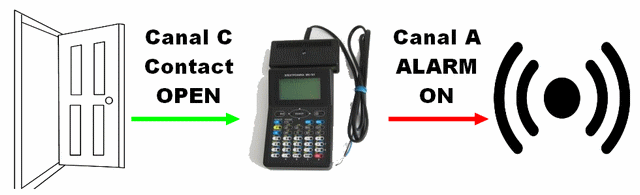
Let's imagine that a door is wired to Canal C to know if it's open or closed. We want to switch an alarm ON everytime it's open and then switch the alarm OFF when it is closed again.
       ; parallel port
1 SET \IOmode
DO
       ; wait for canal C to be OPEN
  REPEAT
    GET \IOModule
    8 AND
  UNTIL(x<>0)

       ; if OPEN then switch ON alarm
       ; on canal A
  5 SET \IOModule

       ; wait for canal C to be closed
  REPEAT
    GET \IOModule
    8 AND
  UNTIL(x=0)

       ; when closed switch OFF alarm
       ; on canal A
  7 SET \IOModule

LOOP
|
Compiled listing:
     PROGAM ZONE
  Step  | Code | Keys
-------------------------
  0000  |  01  | 1
  0001  |  F4  | PP M
  0002  |  90  | 9 0
  0003  |  90  | 9 0
  0004  |  F6  | PP RM
  0005  |  90  | 9 0
  0006  |  92  | 9 2
  0007  |  08  | 8
  0008  |  37  | K AND
  0009  |  57  | F X!=0
  0010  |  04  | 0 4
  0011  |  05  | 5
  0012  |  F4  | PP M
  0013  |  90  | 9 0
  0014  |  92  | 9 2
  0015  |  F6  | PP RM
  0016  |  90  | 9 0
  0017  |  92  | 9 2
  0018  |  08  | 8
  0019  |  37  | K AND
  0020  |  5E  | F X=0
  0021  |  15  | 1 5
  0022  |  07  | 7
  0023  |  F4  | PP M
  0024  |  90  | 9 0
  0025  |  92  | 9 2
  0026  |  51  | GOTO
  0027  |  04  | 0 4
-------------------------

   Reg  |  Name
-------------------------
  9090  |  \IOMODE
  9092  |  \IOMODULE
-------------------------

--     END OF FILE     --
|
 |
The disk is organized in 2048 blocks of 264 bytes each. I suppose that 8 bytes in each block are reserved for internal managment and that only 256 bytes are used for your data. So 256×2048=512×1024=512 kB. |
 |
| Precision Tests | Speed tests | |||||
| Forensic This is a test on scientific functions, in degrees, you type: arcsin(arccos(arctan(tan(cos(sin(9)))))) Result: 8,9999999772404. The theoric value is 9 ! |
Hebdogiciel20 =0 =1 2 FOR 0 SQR NEXT FOR 1 X^2 NEXT STOPResult: 1,9999999837026 The theoric value is 2 ! |
Boucle simple:
0000 +
0001 GOTO 00
Starting with 1 1 1 0 on the stack and during 60 seconds, the sum is 95756. It's about 800 times faster than the MK-61... |
PI Calculation
Using the program above on this page:
|
Use "RadioButtons", multiple menus, SELECT/ENDSELECT |
Use checked lines. |
Use the progress bar, multiple menus, FOR/NEXT, time calculation, sound. |
Use a graphical menu with blocks inside an icon. |
#MKFiles 2 ;-------------------- ; Register definitons ;-------------------- #reg a GrainNum ; how many grains of sand per run #reg b PiValue ; resulting PI approximation (for display) #reg c Total ; accumulator of grains of sand through the runs #reg d InsideCircle ; accumulator of grains inside the quarter of circle #reg e Duration ; duration of a run in HH.MMSS (for display) #reg 7 Address ; address of the subprogram corresponding to the active element #reg 0 Hundred ; for looping #reg 1 Iter ; idem #reg 6 progress ; value from 9 to 116 for bar progression #reg 5 done ; flag for second menu #reg 4 limit ; to limit number of iterations |
If you drop at random grains of sand onto a square, 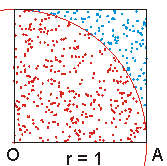 the probability that it falls into the quarter of circle is equal to:  So, you can simulate this and get an approximation of PI! |
;-------------------- ; Main Menu description ;-------------------- #MENU ; this is menu 0 #STRING 1 "PI MonteCarlo" ; The title in big font #HLINE ; separator #VINPUTD "Hundreds grains :" 92 GrainNum verif ; one "input" line to set GrainNum and ; a verification routine to validate entry #ACTION "Run !" Calculation ; one "action" line (will go to Calculation) #OUTPUTD 0 "PI =" 32 PiValue ; one "output" line showing register PiValue #OUTPUTF 0 "Time :" 50 Duration 2 4 ; one "output" formatted line to display time #HLINE ; separator #ACTION "Exit !" ProgramEnd ; one "action" line (will go to ProgramEnd) #ENDMENU |
Here is what it will look like: 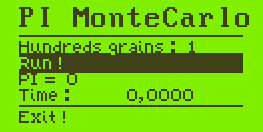 Click on
|
;-------------------- ; Sub Menu description ;-------------------- #MENU ; this is menu 1 #STRING 1 "Calculating..." ; a big title #BLANK 10 ; jump lines #STARTRECT ; a rectangle to enclose... #PROGRESSBAR progress ; ... the progress bar based on register "progress" #ENDRECT ; close rectangle #BLANK 10 ; jump lines #?LINK "Progress..." 0 Done "Done !" ; conditional link, display "Progress" during calculation ; and display "Done !" at the end (when register done=1) ; this is a link to menu 0. #ENDMENU |
There you can see the progress bar: |
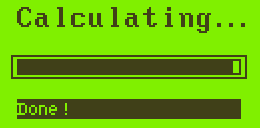 Clic on "Done !" to go back to the main menu. |
 You get the value of PI and the calculation time. |
Then, this is a common program, you can see next the initializations of the variables. The heart of the system is entirely included in the "#MENUMAINLOOP" that containss everything your program needs to manage the menus. Then all you have to do is to prepare the different sub programs that react to the interactions with the screen. |
;-------------------- ; My initializations ;-------------------- CX =PiValue =Total =InsideCircle =Duration =done 1 SET GrainNum ; default = 1 hundred = 100 grains per run 9 SET progress ; 9 = 0% in the progress bar $1000 SET limit ; no more than 1000 hundreds ;-------------------- ; The main loop here ;-------------------- #MENUMAINLOOP Address |
ProgramEnd: ; if Exit! selected, just stop. STOP |
is easy: it verifies that you don't exceed the limit and that your value is greater than zero. |
verif: @GrainNum ; entered value /-/ IF(X>=0)THEN 1 =GrainNum ; if negative or nul, then back to 1 ELSE @limit + IF(x<0)THEN ; if limit<entry @limit =GrainNum ; then back to limit ENDIF ENDIF RTN |
;-------------------- ; My subprograms ;-------------------- Note: ; subprogram to make a sound ENT $20 EXEC \Sound ; ENTERs the frequency, 20/100 sec for duration REPEAT GET \SOUND ; is sound terminated? UNTIL(x=0) ; if not equal to zero, go on RTN Calculation: 0 =done ; for conditional link #GOTOMENU 1 0 ; swap to menu 1, active element 0 GET \TIME HMS> =Duration ; start time saved @GrainNum =Hundred ; for the loop SUM Total ; update the accumulator with new grains FOR Hundred ; for every hundred of grains 1 ENTER @Hundred @GrainNum / - ; compute progress bar position (9-116) $107 * 9 + =progress ; according to loop value #REDRAW ; and display new bar $100 =Iter ; run for one hundred grains FOR Iter RAN X^2 RAN X^2 + 1 - ; compare 1 with random x^2+y^2 IF(x<0)THEN ; if <1 then 1 SUM InsideCircle ; 1 on the accumulator ENDIF NEXT NEXT $116 =progress ; progress bar at 100% 1 =done ; change conditional link #REDRAW ; and display interface @InsideCircle @Total / $25 / =PiValue ; (inside/total) / 100 * 4 = PI GET \TIME HMS> @Duration - >HMS =Duration ; newtime-starttime = duration $523 Gosub Note ; marvellous music to say it's done $880 Gosub Note $699 Gosub Note RTN |
It starts at "Calculation", some initializations are done (flags, start time, display second menu with progress bar). Then the main loop updates the position of the progress bar and drops grains of sand by packets of 100. When everything is done, Pi is computed, the total time calculated, flags are changed and you can hear a 3 notes music to know that it's over. No return is forced to Main menu as the main loop will do it for us : at the end of calculation, you have to select "Done !" in the submenu, the is linked to menu 0. |